 hSoftware Garmin Connect IQ Apps
Product - Referee Stopwatch and Activity Tracker [hReferee]
Details
| 
|


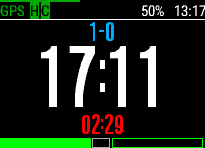
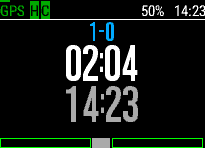
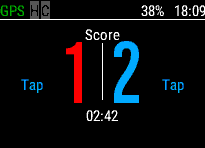
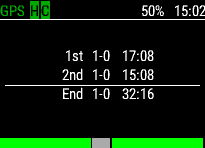
Description - Version 9.2
Monitor and record your referee activity
* New Kick-Off Indicator
* Support for Sin Bins and Sanctions recording
* Match Final Score saved to Garmin Connect
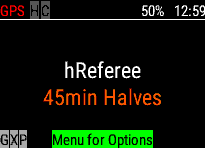
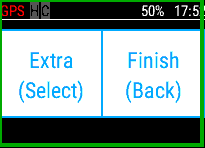
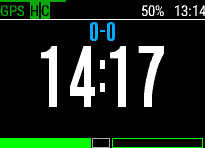
The Application is designed to monitor and record your activity during a refereeing session. The activity can be based on a discipline with a number of periods and breaks. For example Soccer (2 Halves) or American Football (4 Quarters).
The App records your activity during the period and allows you to the move into a rest break (e.g. Soccer Half-Time) then return for the remaining periods. If the activity is indoors, the App records Steps rather than Distance without GPS.
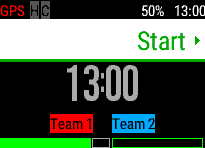
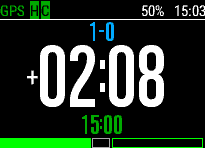
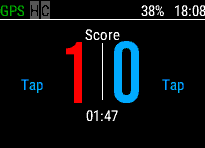
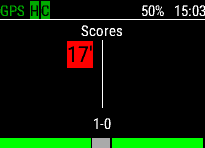
The App also allows the recording of a activity Score. Press the Menu Key to view the current Score page. Tapping on the Team (left or right), or pressing Up or Down, can increase the Score. Pressing Back Twice on the Score page will undo the last Score. The Score is recorded against the time for later review. To assist, the team colours can also be modified before the session starts by pressing in the same manner. Before kick-off press menu to select the starting team. To close the score page, press the menu key again.
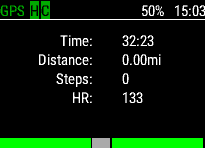
Move Up and Down during the Activity to display other timing screens, including the Time Elapsed or Remaining.
The App can be customised from the Menu Key on the Start Screen. The options are:
- Duration: The duration of a period in minutes, for example 45 minutes for soccer. If the Pause Mode (see below) is enabled, breaks (e.g. injury time) can be recorded; otherwise the period can be ended using the Enter Key. A custom duration can be defined using the Garmin Connect App.
- Periods: The number of periods in your activity, for example 2 for soccer.
- Extra-Time: If the activity requires extra-time. At the end of normal time (after the chosen periods), then an option is displayed to include more periods; otherwise the session ends.
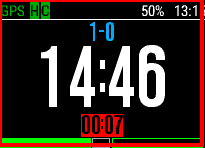
- Pause: Allow the period to be paused (not available within breaks) to capture the time. This time is then counted down after the normal period time completes, so you know when to stop. Note the Enter Key will record pause time when enabled, and you cannot move to the next period until the chosen time has elapsed. The 'On Plus' option allows you to record additional injury time after normal time has elapsed. Note to exit the period, you will need to double-press the Enter key. Once paused, Sin Bins (Up Press or Swipe Right) and Sanctions (Down Press or Swipe Left) can be recorded.
- GPS: Determine if you would like to enable GPS to record movement during the session.
- Distance: Display distances in Metric (Kilometres) or Statute (Miles)
- Background: Background Colour of Black or White.
The Start the App, press the Enter key. This key also moves to the next break or period. Note, for safety, you can't move before 5 seconds has completed. You can review all the periods, breaks and summary by moving Left or Right. If you which to cancel the session press Back three times to abort. You can force exit from a period by multiple presses on the Enter key.
With Sin Bin's enabled: To start a Sin Bin timer, first pause the session. This will start a countdown on the number of minutes set (in yellow). This time will also pause, when the timer is paused. You can also record a Sanction (Yellow or Red Card) at the same time.
The Score is recorded into the Garmin Connect Activity File for Reference.
Releases (71)
| Product | Release | API | Devices | Languages | Date | ||
|---|---|---|---|---|---|---|---|
 | hReferee | 9.2 | 1.3 | 123 of 160 Devices | English | 11 March 2026 | Info |
 | hReferee | 9.1 | 1.3 | 118 of 151 Devices | English | 26 June 2025 | Info |
| hReferee | 9.0 | 1.3 | 105 of 137 Devices | English | 30 August 2024 | Info |
| hReferee | 8.7 | 1.3 | 108 of 132 Devices | English | 23 August 2024 | Info |
| hReferee | 8.6 | 1.3 | 102 of 125 Devices | English | 24 November 2023 | Info |
| hReferee | 8.5 | 1.3 | 99 of 122 Devices | English | 23 June 2023 | Info |
| hReferee | 8.4 | 1.3 | 91 of 114 Devices | English | 27 April 2023 | Info |
| hReferee | 8.3 | 1.3 | 86 of 107 Devices | English | 13 December 2022 | Info |
| hReferee | 8.2 | 1.3 | 86 of 107 Devices | English | 29 November 2022 | Info |
| hReferee | 8.1 | 1.3 | 80 of 101 Devices | English | 15 June 2022 | Info |
| hReferee | 8.0 | 1.3 | 72 of 93 Devices | English | 05 February 2022 | Info |
| hReferee | 7.4 | 1.3 | 72 of 90 Devices | English | 26 January 2022 | Info |
| hReferee | 7.3 | 1.3 | 67 of 85 Devices | English | 23 August 2021 | Info |
| hReferee | 7.2 | 1.3 | 67 of 85 Devices | English | 15 July 2021 | Info |
| hReferee | 7.1 | 1.3 | 62 of 82 Devices | English | 10 April 2021 | Info |
| hReferee | 7.0 | 1.3 | 61 of 79 Devices | English | 28 November 2020 | Info |
| hReferee | 6.10 | 1.3 | 61 of 79 Devices | English | 24 November 2020 | Info |
| hReferee | 6.9 | 1.3 | 61 of 79 Devices | English | 23 November 2020 | Info |
| hReferee | 6.8 | 1.3 | 61 of 79 Devices | English | 23 November 2020 | Info |
| hReferee | 6.7 | 1.3 | 61 of 79 Devices | English | 21 November 2020 | Info |
| hReferee | 6.4 | 1.3 | 55 of 79 Devices | English | 18 November 2020 | Info |
| hReferee | 6.3 | 1.3 | 55 of 74 Devices | English | 16 September 2020 | Info |
| hReferee | 6.2 | 1.3 | 55 of 74 Devices | English | 15 September 2020 | Info |
| hReferee | 6.1 | 1.3 | 55 of 74 Devices | English | 13 September 2020 | Info |
| hReferee | 6.0 | 1.3 | 54 of 74 Devices | English | 01 September 2020 | Info |
| hReferee | 5.11 | 1.3 | 54 of 73 Devices | English | 24 August 2020 | Info |
| hReferee | 5.10 | 1.3 | 54 of 73 Devices | English | 11 August 2020 | Info |
| hReferee | 5.9 | 1.3 | 54 of 73 Devices | English | 30 July 2020 | Info |
| hReferee | 5.8 | 1.3 | 54 of 69 Devices | English | 11 March 2020 | Info |
| hReferee | 5.7 | 1.3 | 54 of 69 Devices | English | 06 February 2020 | Info |
| hReferee | 5.6 | 1.3 | 54 of 69 Devices | English | 29 January 2020 | Info |
| hReferee | 5.5 | 1.3 | 53 of 69 Devices | English | 17 January 2020 | Info |
| hReferee | 5.4 | 1.3 | 53 of 69 Devices | English | 03 January 2020 | Info |
| hReferee | 5.3 | 1.3 | 53 of 68 Devices | English | 31 December 2019 | Info |
| hReferee | 5.2 | 1.3 | 53 of 68 Devices | English | 04 December 2019 | Info |
| hReferee | 5.1 | 1.3 | 50 of 68 Devices | English | 11 October 2019 | Info |
| hReferee | 5.0 | 1.3 | 39 of 55 Devices | English | 24 July 2019 | Info |
| hReferee | 4.20 | 1.3 | 39 of 55 Devices | English | 05 June 2019 | Info |
| hReferee | 4.19 | 1.3 | 36 of 50 Devices | English | 26 April 2019 | Info |
| hReferee | 4.18 | 1.3 | 36 of 50 Devices | English | 26 April 2019 | Info |
| hReferee | 4.17 | 1.3 | 29 of 50 Devices | English | 03 April 2019 | Info |
| hReferee | 4.16 | 1.3 | 29 of 45 Devices | English | 07 March 2019 | Info |
| hReferee | 4.15 | 1.3 | 29 of 45 Devices | English | 06 March 2019 | Info |
| hReferee | 4.14 | 1.3 | 29 of 45 Devices | English | 01 February 2019 | Info |
| hReferee | 4.13 | 1.3 | 29 of 45 Devices | English | 31 January 2019 | Info |
| hReferee | 4.12 | 1.3 | 29 of 45 Devices | English | 25 January 2019 | Info |
| hReferee | 4.11 | 1.3 | 29 of 45 Devices | English | 11 January 2019 | Info |
| hReferee | 4.10 | 1.3 | 29 of 45 Devices | English | 09 January 2019 | Info |
| hReferee | 4.9 | 1.3 | 29 of 43 Devices | English | 17 December 2018 | Info |
| hReferee | 4.8 | 1.3 | 29 of 43 Devices | English | 16 November 2018 | Info |
| hReferee | 4.7 | 1.3 | 29 of 43 Devices | English | 05 November 2018 | Info |
| hReferee | 4.6 | 1.3 | 29 of 43 Devices | English | 05 November 2018 | Info |
| hReferee | 4.5 | 1.3 | 29 of 43 Devices | English | 05 November 2018 | Info |
| hReferee | 4.4 | 1.3 | 29 of 43 Devices | English | 05 November 2018 | Info |
| hReferee | 4.3 | 1.3 | 29 of 43 Devices | English | 14 October 2018 | Info |
| hReferee | 4.2 | 1.3 | 29 of 43 Devices | English | 13 October 2018 | Info |
| hReferee | 4.1 | 1.3 | 29 of 43 Devices | English | 12 October 2018 | Info |
| hReferee | 4.0 | 1.3 | 29 of 43 Devices | English | 06 October 2018 | Info |
| hReferee | 3.4 | 1.3 | 29 of 37 Devices | English | 22 September 2018 | Info |
| hReferee | 3.3 | 1.3 | 29 of 37 Devices | English | 09 September 2018 | Info |
| hReferee | 3.2 | 1.3 | 29 of 37 Devices | English | 09 September 2018 | Info |
| hReferee | 3.1 | 1.3 | 29 of 37 Devices | English | 26 July 2018 | Info |
| hReferee | 3.0 | 1.3 | 22 of 36 Devices | English | 30 May 2018 | Info |
| hReferee | 2.6 | 1.3 | 22 of 36 Devices | English | 27 April 2018 | Info |
| hReferee | 2.5 | 1.3 | 22 of 31 Devices | English | 27 March 2018 | Info |
| hReferee | 2.4 | 1.3 | 22 of 31 Devices | English | 26 March 2018 | Info |
| hReferee | 2.3 | 1.3 | 22 of 31 Devices | English | 23 March 2018 | Info |
| hReferee | 2.2 | 1.3 | 22 of 31 Devices | English | 16 March 2018 | Info |
| hReferee | 2.1 | 1.3 | 22 of 31 Devices | English | 09 March 2018 | Info |
| hReferee | 2.0 | 1.3 | 22 of 31 Devices | English | 01 March 2018 | Info |
| hReferee | 1.0 | 1.3 | Vivoactive | English | 25 February 2018 | Info |